
PgTgBridge — Now Available

PgTgBridge

FlexRadio® × Elecraft® — Seamless Interoperability

Connect your FlexRadio® FLEX-6000, FLEX-8000, or Aurora™ series radio to your Elecraft® KPA1500, KPA500, or KAT500—automatically, silently, and reliably. PgTgBridge runs in the background, and doesn't get in your way. Your radio and amp/tuner just work as one.

It works like a impedance bridge between vendor ecosystems. Fills a real niche.
— A. I. Claude
Capabilities

Seamless Interoperability

PgTgBridge handles the complexity of cross-brand communication so you can focus on operating, not troubleshooting.

Network Translation

Translates the SmartSDR™ network protocols in real time, enabling, Power, SWR and Temperature data to display in the native FlexRadio SmartSDR™/iOS software and Maestro™ interfaces. Enables the Amp and Tuner tabs in SmartSDR™, plus Amplifier Operate/Standby and Tuner Enable/Bypass controls.

Windows Service

PgTg installs as a native Windows Service that starts automatically with your PC — always running in the background, no manual launch needed. The workstation running PgTg does not require a user to be logged in to operate normally.

FlexRadio® Compatible

Fully supports the FlexRadio® FLEX-6000 series, FLEX-8000 series, and the new Aurora™ SDR radios. PgTg can be configured to bind to a specific radio when multiple radios are on the same subnet.

Plugin Architecture

PgTg is not locked to Elecraft hardware. The plugin system allows support to be added for additional manufacturers of amplifiers and tuners as the ecosystem grows. Currently plugins are included for the Elecraft KPA1500 amp/tuner, the KPA500 amplifer and the KAT500 tuner.


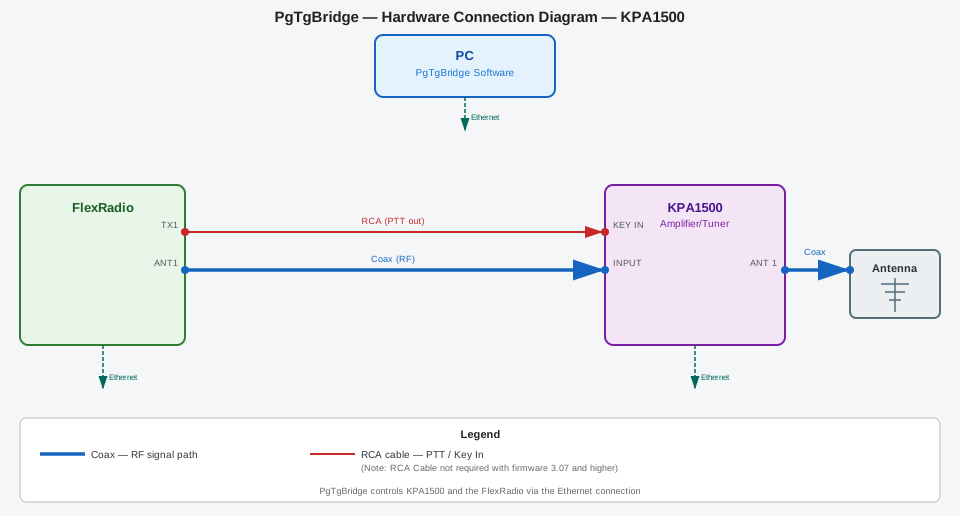
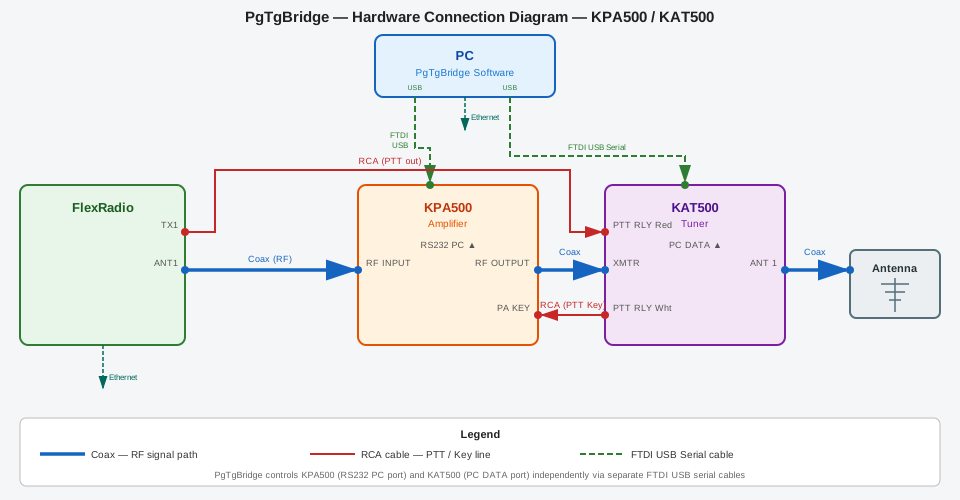
Also included is a GPIO plugin that controls relay hats on a Raspberry Pi. This is useful to remotely key the KPA500 amplifer. Flexible Triggers are available for PTT, Amp Operate/Standby, Tuner Enable, and Tune cycle start. For the KPA1500, no extra hardware or USB cabling is needed. PgTg sends band data and PTT keying commands over the network so you can move supported hardware into a different room from the radio.


View Pi Services on GitHub
C# Plugin SDK

C# developers can build and share their own amplifier and tuner plugins using the same public interfaces that PgTg uses internally.

Sample project templates for Amplifier, Tuner and combination of both. Full documentation is available on GitHub.


View Plugin projects on GitHub
System Tray Controller

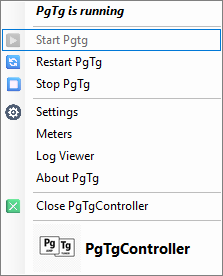
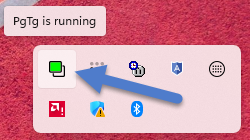
A lightweight tray application gives you instant access to PgTg status, start/stop controls, and settings without cluttering your desktop.

PgTg Tray Icon
PgTg Tray App
System Setting - Radio Discovery

Radio selection is automatic, or a specific radio can be bound to PgTg when there are multiple radios on your network subnet.

PgTg Radio Discovery
System Setting - Options

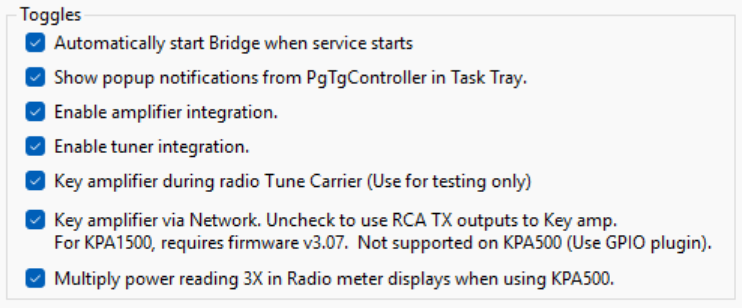
Checkbox options allow user customization of features. If you are not using a tuner, that feature can be hidden.

PgTg Settings Options
System Setting - Meters

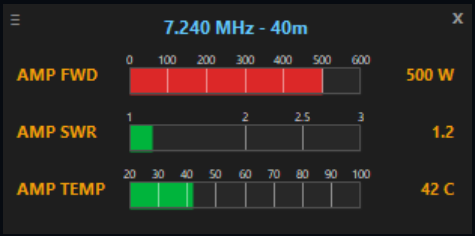
A resizable floating meter panel reports Power, Temperature and SWR values.

PgTg Meters panel

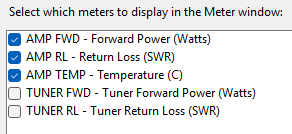
The visiblity of each meter bargraph is configurable.

PgTg Meters config
Station Log

Latest News

All Posts →
Release

PgTgBridge v1.26.983.1 GA Released— Build Now Available

After extensive testing and many builds, PgTgBridge build #983 is now in General Available status. This build supports all FLEX-6000/8000 series radios paired with either an KPA1500 or KPA500 / KAT500 pair.

Read More
Developer

Plugin SDK Documentation Published — Build Your Own Integration

The PgTg Plugin SDK documentation is now live. C# developers can create custom amplifier and tuner plugins using the same public interfaces used by PgTgBridge internally. Full API reference and sample projects are included.

Read More
Aurora™

FlexRadio® Aurora™ Series Support Added in Beta

PgTg now includes support for the FlexRadio® Aurora™ series. Though using an external amplifier with Aurora series is not needed, testing confirms PgTg operation with Aurora radios can be leveraged to control a tuner such as the KAT500 in a remote location.

Read More
In Action

Visual Transmissions

Watch PgTgBridge integrate FlexRadio on the Maestro and in SmartSDR™ with Elecraft® amplifiers in these rough cut videos.

FlexRadio integration with the Elecraft KPA1500

FlexRadio integration with the Elecraft KPA500 / KAT500

Support

Questions & Answers

What equipment do I need for PgTgBridge to operate?

You need one of the supported radio models from FlexRadio® and one of the supported amplifiers from Elecraft®

You also will need a PC running Windows 10 / 11 to run PgTgBridge.

I am already using my Elecraft® amplifier with my FlexRadio® right now. What does PgTgBridge offer to sweeten the deal?

Of course, you can use the radio and amplifier/tuner as you are right now. However, PgTgBridge adds some great functionality that you are missing out on.

Specifically:

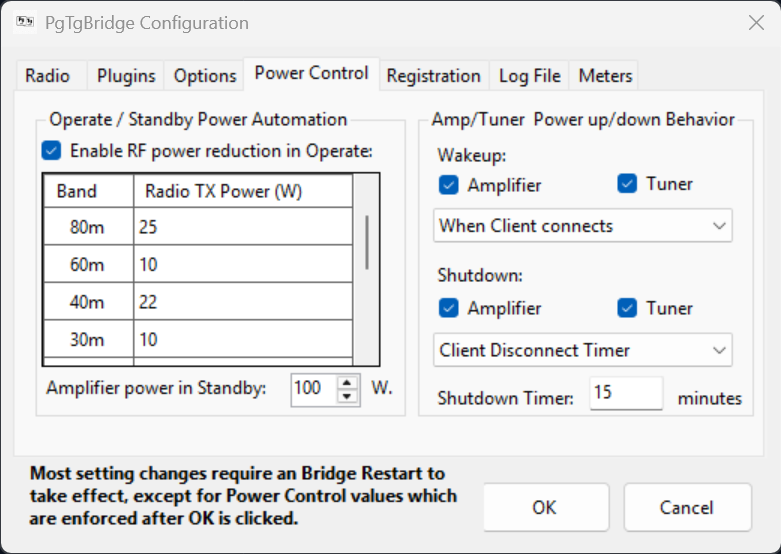
  • Operate / Standby power control. PgTg will change the radio transmit power level when you toggle the operate mode on the amp.
  • Minimal wiring. If you are using a KPA1500, you do not need the USB Cable or PTT cable connected to the radio. PgTgBridge sends that information over the Ethernet connection. You can move the KPA1500 into another room as long as it has a network connection. (with a bit of extra work, the same goes for the KPA500)
  • No need to “remote in” to run the KPA “Remote” programs to control the amplifier when remotely connected to your FlexRadio® All the control and metering will be available within SmartSDR, iOS app, or Maestro™
  • Optional floating/resizable/configurable Meter display on the workstation.
I have a “M” model of the 6000, or 8000 series radios. Does PgTgBridge work with my radio?

Yes, absolutely! PgTgBridge works just fine with FlexRadio® models having the front display. The interface looks the same as on a Maestro™ You will see two icons appear near the MENU button for Amp and Tuner status. If you open the METERS panel, you can add meters displaying amplifier power, SWR and temperature, plus tuner power and SWR as well. You can even use the SmartControl mode and monitor another user’s operations.

I only have one PC that I use for all of my Hamradio programs, including logging and running an FT8 application. Will PgTgBridge slow down my PC or interfere with my other programs?

PgTgBridge is written to use multiple threads asynchronously. Resource utilization is very low, typically under 3% CPU load. You will never notice it! The PgTg Service uses about 78 Megs of RAM, and the PgTgController adds an addition 120 Megs. In terms of a typical, modern PC suitable for running Windows 10, these are small numbers. If you are concerned, you can close PgTgController to regain some resources, and the PgTgBridge Windows Service will continue operating normally in the background.

When a new version of PgTgBridge is available, how hard is it to update my installation? Do I have to uninstall PgTgBridge before updating it?

Updating PgTgBridge is very easy! You don’t need to do anything special, though you can stop the service if you want to. After downloading the installer for a new version, just execute in the same way you first installed PgTgBridge. The installer will stop the service and controller, update them, and restart the new version for you. Your settings will be retained during upgrades. Even if you uninstall PgTgBridge completely, your settings file will remain in case you want to reinstall it.

I run a contest station and have multiple radios on the network. Does PgTgBridge support more than one radio at a time?

No, not at this point. PgTgBridge is currently written to bind to a single radio at one time. You will need to install PgTgBridge on separate PCs, one for each radio. Then, you configure each installation to bind to the desired radio it is allocated for. You likely have a PC for each operating station for logging, so you should install PgTgBridge on each one. It won’t get in the way of your other applications.

I use the FlexRadio® MultiFlex feature. What happens when two clients are connected to my 6600 or 8600 radio at the same time?

Both clients will see the amplifier and tuner controls, along with the metering. PgTgBridge will follow the Transmit slice frequency (as it changes depending on which client is in PTT) and keep the amplifier and tuner synchronized.

I have bought a new FlexRadio® model (or replaced it). Can I transfer my registration to my new radio?

Sorry, no. The registration is tied to the radio serial number. If you sell that radio, the new owner will be able to install and use PgTgBridge with it. (You should give the new owner the registration code as an incentive to buy it!) You will have to obtain another registration code for your new radio if you want to continue using PgTgBridge.

Sometimes it seems that PgTgBridge isn’t working or one of the meters isn’t displaying data. What should I do?

If restarting PgTgBridge from the Controller doesn’t help, you may need to restart the radio and or your PC too.

Why is PgTgBridge classified as Trialware?

“Try before you buy” is a long standing idea. PgTgBridge is a niche application that may or may not be useful to you. PgTgBridge is configured to run in full operational mode for a trial period before disabling itself. The trial period is quite generous at 60 days— long enough to decide if you like what I’ve done here. PgTgBridge is not Open Source, so it’s not free! I am sure you will realize the value of having PgTgBridge in your shack, well before the trial period expires.

Will there be updates to PgTgBridge going forward?

Yes! PgTgBridge is still being actively developed and refined. It’s not perfect. There may be bugs! It’s software after all, it will always need to evolve.

Downloads

Get PgTgBridge

Compatibility
Supported Hardware
FlexRadio® Radios
FLEX-6300 · FLEX-6400 · FLEX-6500 · FLEX-6600 · FLEX-6700 · FLEX-8400 · FLEX-8600 · Aurora™ Series Series · Including M Suffix radios
Elecraft® Equipment
KPA1500 Amplifier · KPA500 Amplifier · KAT500 Antenna Tuner
Optional hardware required to enable remote KPA500 data and PTT keying over TCP
Raspberry Pi (Pi OS Trixie) · with/GPIO Relay Hat (or) 4/8/16 Relay Hat from Sequent Microsystems. Choose Solid State Relay version for silent QSK CW keying of KPA500. Allows relocation amp and tuner into a different location.
For Developers
Plugin SDK

Build custom amplifier and tuner plugins for PgTgBridge using C#. The SDK provides all interfaces, documentation, and sample projects needed to extend hardware compatibility beyond the built-in support. Get your A.I. Prompting hat on!

  • Full C# interface documentation
  • Sample amplifier plugin C# project
  • Sample tuner plugin C# project
  • Sample amplifer/tuner C# plugin project
View on GitHub